> ## Documentation Index
> Fetch the complete documentation index at: https://docs.specterops.io/llms.txt
> Use this file to discover all available pages before exploring further.
# PREVENT-2
> Disable Fallback to NTLM
## Summary
Within SCCM's client push installation properties, there exists a setting to "Allow connection fallback to NTLM." This setting allows the site server to fallback to NTLM if Kerberos fails (Figure 1).
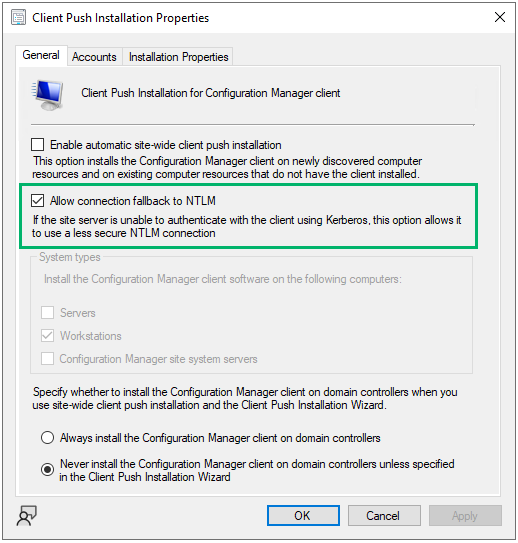 Adversaries commonly abuse NTLM authentication by coercing computers to authenticate to an attacker-controlled machine then either capturing or relaying the authentication to another resource.
Disabling this setting prevents the use of NTLM authentication and coercion.
**NOTE:** This technique must be used in conjunction with [PREVENT-1](../PREVENT-1/prevent-1_description).
## Linked Defensive IDs
* [PREVENT-1: Patch site server with KB15599094](../PREVENT-1/prevent-1_description)
* [PREVENT-5: Disable automatic side-wide client push installation](../PREVENT-5/prevent-5_description)
## Associated Offensive IDs
* [ELEVATE-2: NTLM relay via automatic client push installation](../../../attack-techniques/ELEVATE/ELEVATE-2/ELEVATE-2_description)
* [ELEVATE-3: NTLM relay via automatic client push installation and AD System Discovery](../../../attack-techniques/ELEVATE/ELEVATE-3/ELEVATE-3_description)
## References
* Chris Thompson, [Coercing NTLM Authentication from SCCM](https://posts.specterops.io/coercing-ntlm-authentication-from-sccm-e6e23ea8260a)
Adversaries commonly abuse NTLM authentication by coercing computers to authenticate to an attacker-controlled machine then either capturing or relaying the authentication to another resource.
Disabling this setting prevents the use of NTLM authentication and coercion.
**NOTE:** This technique must be used in conjunction with [PREVENT-1](../PREVENT-1/prevent-1_description).
## Linked Defensive IDs
* [PREVENT-1: Patch site server with KB15599094](../PREVENT-1/prevent-1_description)
* [PREVENT-5: Disable automatic side-wide client push installation](../PREVENT-5/prevent-5_description)
## Associated Offensive IDs
* [ELEVATE-2: NTLM relay via automatic client push installation](../../../attack-techniques/ELEVATE/ELEVATE-2/ELEVATE-2_description)
* [ELEVATE-3: NTLM relay via automatic client push installation and AD System Discovery](../../../attack-techniques/ELEVATE/ELEVATE-3/ELEVATE-3_description)
## References
* Chris Thompson, [Coercing NTLM Authentication from SCCM](https://posts.specterops.io/coercing-ntlm-authentication-from-sccm-e6e23ea8260a)