

Summary
This will prevent successful relay of NTLM authentication to SMB on the system where this setting is enabled, preventing several of the TAKEOVER attack techniques. This configuration can be changed in the following group policy:- “Microsoft network server: Digitally sign communications (always)” ->
Enabled
Computer Configuration > Policies > Windows Settings > Security Settings > Local Policies > Security Options or in the registry at HKLM\System\CurrentControlSet\Services\LanManServer\Parameters\RequireSecuritySignature, which should be set to 1.
Note that configuring the following setting on SMB clients in the environment (i.e., systems that could be coerced) will not prevent relay of authentication coerced from those clients to SMB servers because SMB negotiates signing in headers that can be stripped by an attacker in the middle of the connection.
- “Microsoft network client: Digitally sign communications (always)” ->
Enabled
NTLM
NOTE: This is a very high level overview of the NTLM protocol for the context of this article. We highly recommend reviewing Pixis’s articles on NTLM and NTLM relay for further detail. This technique is heavily based on these great resources. NTLM authentication is an authentication protocol used in Windows environments. The protocol uses a challenge and response design. When a client wants to access a server, the client sends a “Negotiate” message. The server responds with a “Challenge” message containing a 64-bit nonce challenge. Next, the client encrypts the challenge using its password as the key and sends the encrypted challenge back to the server with its domain and username. At this point, the server determines (with the help of the NetLogon service and a domain controller) if the challenge was encrypted with the correct password (NT hash) and makes an authentication decision. There’s an important distinction here. The aforementioned NTLM process represents an “authentication” layer, which is then encapsulated in a session layer using protocols such as HTTP, SMB, LDAP, MSSQL, etc (Figure 1).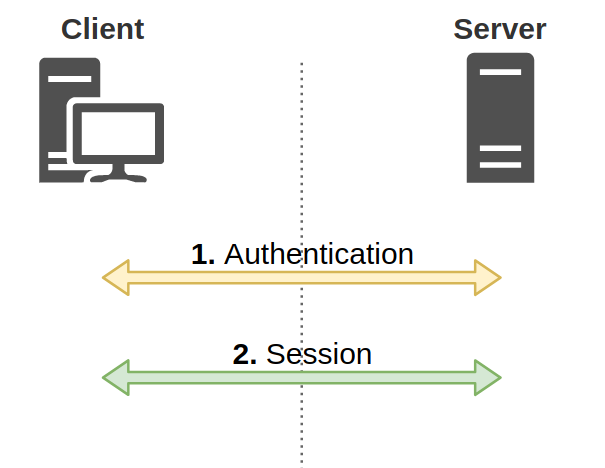
Figure 1 - Authentication and session layers
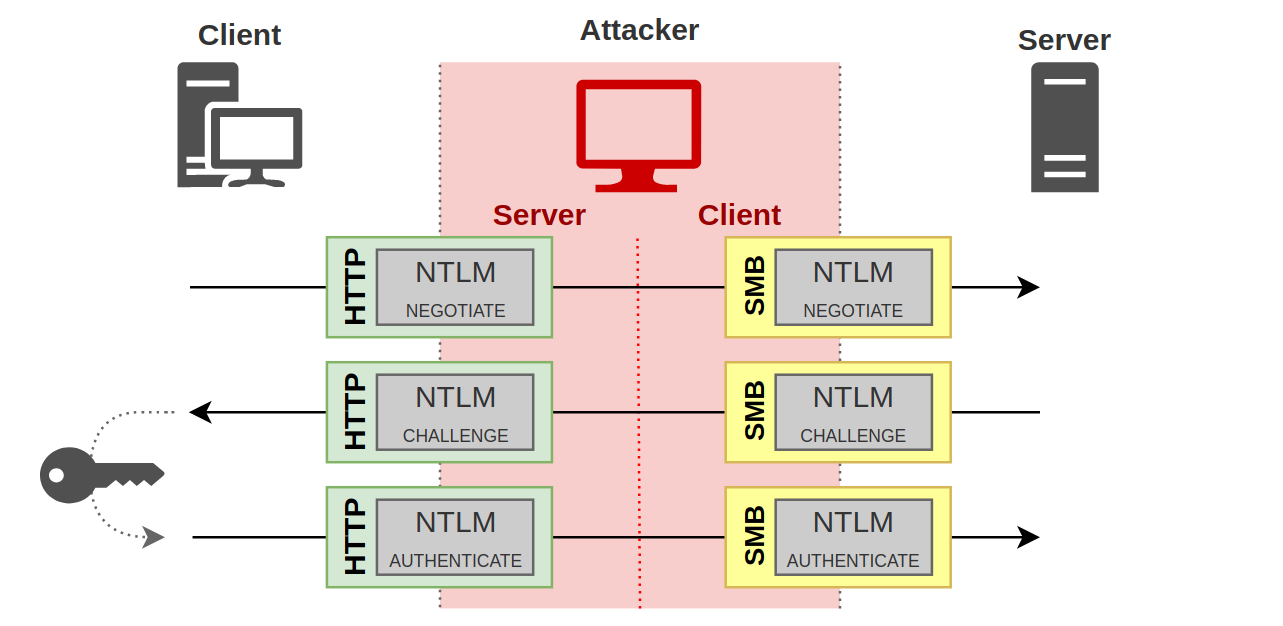
Figure 2: NTLM Cross-protocol relay
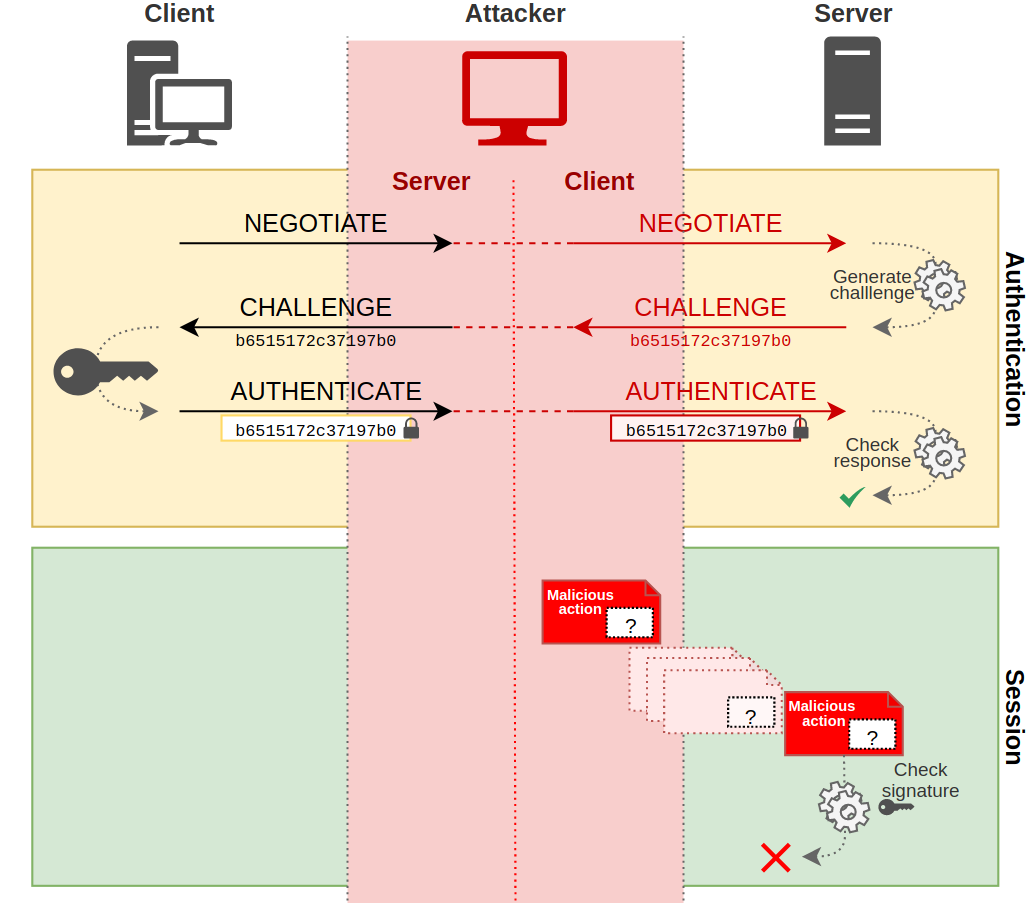
Figure 3: Session signing failed
SMB Signing
Server Message Block (SMB) signing refers to session signing for the SMB protocol. There are two components that will determine if SMB messages are signed. First, at the authentication layer, the NTLM protocol will determine if signing is supported based on the value of theNEGOTIATE_SIGN flag. When this flag is set to 1, the client supports signing. Next, depending on the version and options of the SMB protocol used, signing may be required, enabled, or disabled.
- Disabled: Signing is not managed
- Enabled: The client or server can sign and signing may occur based on settings
- Required: Messages must be signed
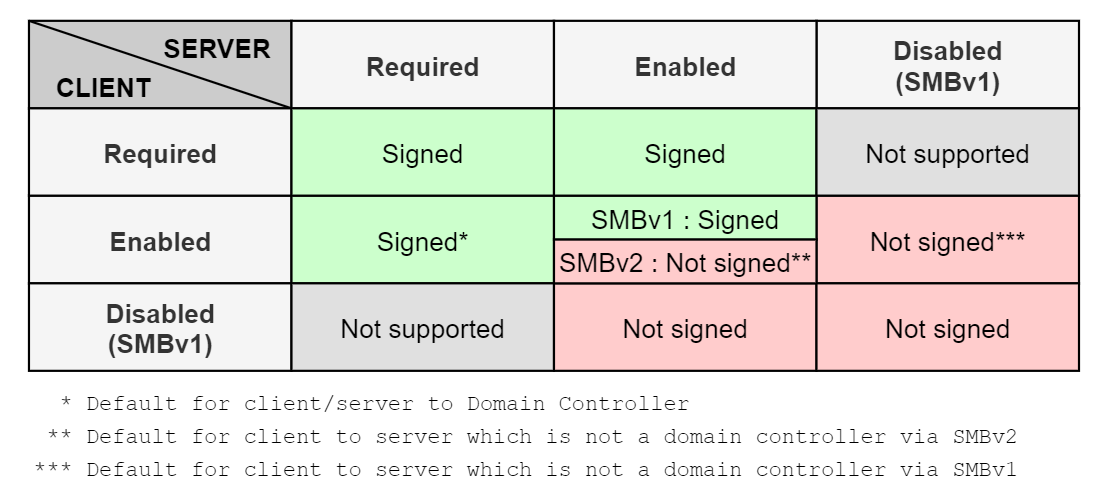
Figure 4: SMB signing matrix
Linked Defensive IDs
- PREVENT-13: Require LDAP channel binding and signing on DCs
- PREVENT-14: Require EPA on AD CS and site databases
- PREVENT-20: Block unnecessary connections to site systems
Associated Offensive IDs
- ELEVATE-1: NTLM relay site server to SMB on site systems
- ELEVATE-2: NTLM relay via automatic client push installation
- ELEVATE-3: NTLM relay via automatic client push installation and AD System Discovery
- TAKEOVER-2: NTLM coercion and relay to SMB on remote site database
- TAKEOVER-4: NTLM coercion and relay from CAS to origin primary site server
- TAKEOVER-6: NTLM coercion and relay to SMB on remote SMS Provider
- TAKEOVER-7: NTLM coercion and relay to SMB between primary and passive site servers
References
- Pixis, NTLM Relay
- Pixis, NTLM Protocol
- Microsoft, Overview of Server Message Block Signing
- Microsoft, The Basics of SMB Signing
- Ned Pyle, Configure SMB Signing with Confidence