

Summary
There are various attack techniques that rely on controlling an Active Directory computer account. This is a requirement to abuse Kerberos resource-based constrained delegation, which can be combined with TAKEOVER-8, as well as spoofing a computer to request the SCCM computer policy (CRED-2). In order to control a computer account, an attacker must escalate privileges on a computer or create a new computer account in Active Directory. By default, all domain users can create 10 computer accounts, thus presenting attackers with a trivial path of least resistance. This default setting is controlled by the ms-DS-MachineAccountQuota attribute of the domain object. This attribute should be set to zero and more fine-grained policies should be established for accounts that require the ability to create computer objects, such as delegation. To modify this setting (Figure 1):- Open ADUC on a domain controller
- Navigate to the domain
- Right click on the domain and select “Properties”
- Select the “Attribute Editor” tab
- Find the
ms-DS-MachineAccountQuotaattribute - Set the attribute to
0
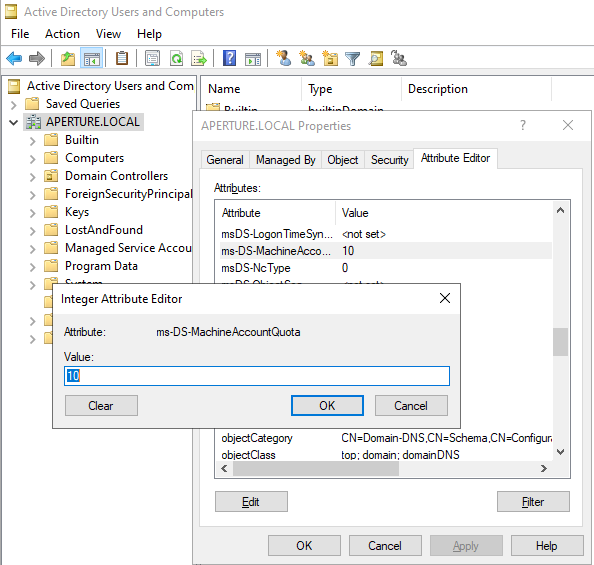
Figure 1 - Modify ms-DS-MachineAccountQuota in ADUC
Default Domain Controllers Policy group policy. By default, this policy grants Authenticated Users the SeMachineAccountPrivilege, which provides the ability to create machine accounts.
To modify this group policy (Figure 2):
- Open Group Policy Management Editor
- Navigate to
Default Domain Controllers Policy - Right click and select “Edit”
- Navigate to
Default Domain Controllers Policy > Computer Configuration > Policies > Windows Settings > Security Settings > Local Policies > User Rights Assignment - Find the
Add workstations to domainpolicy - Right click and select “Edit”
- Remove
Authenticated Users

Figure 2 - Remove SeMachineAccountPrivilege
ms-DS-MachineAccountQuota value of great than 0 but cannot create a machine account. It is due to this group policy being in a non-default state.
Linked Defensive IDs
- N/A
Associated Offensive IDs
- CRED-2: Request computer policy and deobfuscate secrets
- TAKEOVER-8: Hierarchy takeover via NTLM coercion and relay HTTP to LDAP on domain controller
References
- Microsoft, Kerberos Resource-Based Constrained Delegation Overview, https://learn.microsoft.com/en-us/windows-server/security/kerberos/kerberos-constrained-delegation-overview
- Elad Shamir, Wagging the Dog: Abusing Resource-Based Constrained Delegation to Attack Active Directory, https://eladshamir.com/2019/01/28/Wagging-the-Dog.html
- Wolfgang Sommergut, Delegate Permissiosn for Domain Join, https://4sysops.com/archives/delegate-permissions-for-domain-join/
- Microsoft, ms-DS-MachineAccountQuota, https://learn.microsoft.com/en-us/windows/win32/adschema/a-ms-ds-machineaccountquota
- Microsoft, Add workstations to domain, https://learn.microsoft.com/en-us/previous-versions/windows/it-pro/windows-10/security/threat-protection/security-policy-settings/add-workstations-to-domain